Use the Cloudflare Worker script to build a Vless node for free, or use Warp, or buy a cheap VPS to build your own node. With the preferred anti-generation IP/domain name and the preferred CDN IP, many problems can be solved:
- Node speeds up, making it easy to watch 1080P/4K videos;
- Node expansion, multiple countries can be generated in batches and used on demand;
- Node positioning: Using vless built by warp or worker by default, frequent IP changes will cause account risk control;
But for a long time, I didn't like using this method. Because the preferred IP search and speed measurement are cumbersome, the speed will slow down and fail quickly. It's better to use some other methods.
Because I have some needs during this period, and also in order to sort out the various tools I will use during this period, I came up with this article. I have to say that during the sorting process, there were still surprises: I don’t know how many versions of the worker script of the 3K boss have been updated. Not only does it have Vless subscription, but it also has IP selection, covering more than a dozen commonly used countries, which is a step forward. In place. For those who don’t want to choose IP by themselves, it’s also good to just use it.
This article is not a tutorial, only the source of the process and tools. For those who have not used it, please search for tutorials on your own.
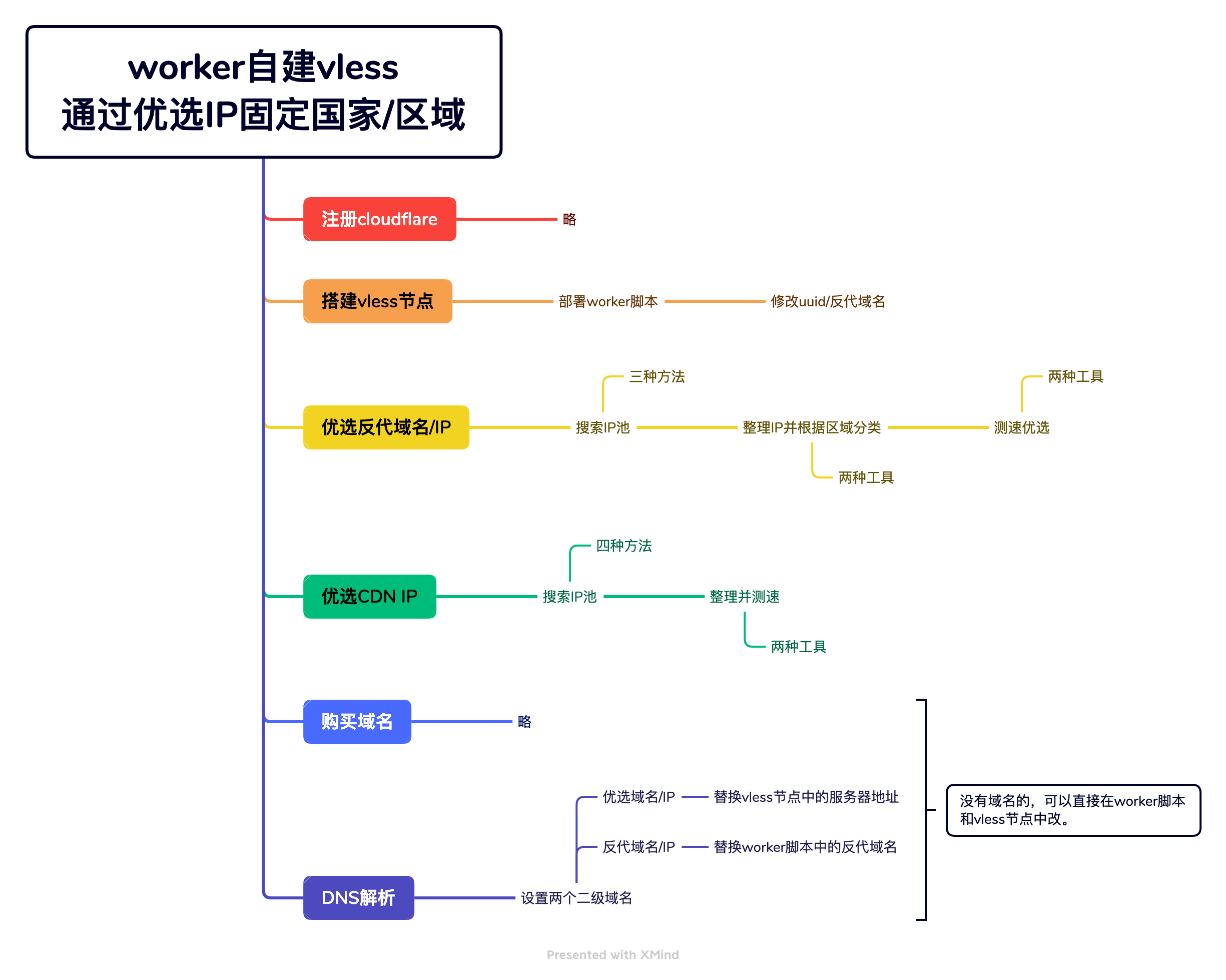
1. Register for Cloudflare
slightly
2. Use workers to build Vless nodes
1, worker script deployment code
https://github.com/3Kmfi6HP/edtunnel/blob/main/_worker.js
2, UUID generation:
https://www.uuidgenerator.net/
3, modify the script
(1) Replace uuid (line 6 of code)
(2) Replace the preferred reverse proxy domain name (line 8 of the code)
3. Prefer anti-generation CDN IP
1, Anti-generation CDN IP pool (updated daily)
(1) https://zip.baipiao.eu.org/
Some of these IPs have expired.
(2) Telegram group push
(3) Online selection of three networks
https://stock.hostmonit.com/CloudFlareYes
2, File format introduction:
(1) ASN autonomous domain number: country or organization IP group, which may be the same country or multiple countries for the same organization;
ASN query: https://zh-hans.ipshu.com/asn_list
(2) 1/0: Whether TLS encryption is applied
(3) 80/443, etc.: port number
3, Quickly merge multiple txt files:
(1) Create a new txt file
(2) Write: type *.txt>>all.txt
(3) Change the txt suffix to bat and run
(4) The all.txt file will be generated, containing all file contents.
4, IP location batch query:
https://lwebapp.com/zh/ip-batch
https://reallyfreegeoip.org/bulk
I tried it, but it’s not entirely accurate. It’s just for reference.
5. IP address query
4. Preferred CDN IP
1,preferredIP
(1) Random acquisition
https://cloudflare.vmshop.org/
(2) Regular updates
https://github.com/hello-earth/cloudflare-better-ip/tree/main/cloudflare
(3) Online scanning
https://vfarid.github.io/cf-ip-scanner/
(4) fofa scan and obtain
Website: fofa.ino
Search syntax: server==”cloudflare” && port==”443″ && header=”Forbidden” && country==”SG”
(5) Temporary mailbox
Each free registered account can obtain 2980 pieces of data on fofa.
2, anti-generation and optimizationIPSpeed test
(1) IP speed test
Basic operations
Others recommend more:
https://github.com/badafans/better-cloudflare-ip/releases/tag/20221201
I'm more comfortable using:
https://github.com/XIU2/CloudflareSpeedTest/
Advanced operations
If you want to customize the speed test URL, port number, etc., please refer to the comments of the experts in GitHub. The following code is for reference only, because I often need to change the port number, so I have not written in more:
CloudflareST.exe -url https://cfspeed1.kkiyomi.top/200mb.bin -tcp 443 -tl 250 -sl 10 -tlr 0.10 -f ip.txt
If there is no download speed using the program's default speed test, it is most likely because there are too many users, which triggers CF's speed limit. You can wait, or use a worker script (requires a domain name) to build a speed test website yourself.
Tutorial:https://www.smallstep.one/article/ip-test-address
(2) Domain name speed testing tool
https://github.com/jeffreycayao/pinginfoview
If you want to use Chinese, replace the "pinginfoview_lng.ini" file yourself.
https://www.nirsoft.net/utils/multiple_ping_tool.html
(3) Optimize domain name list
This batch of domain names has been optimized and selected by the big guys. You can test the speed according to your location and select a few to use.
time.cloudflare.com
shopify.com
time.is
icook.hk
icook.tw
ip.sb
japan.com
malaysia.com
russia.com
singapore.com
skk.moe
cdn.anycast.eu.org
cdn-all.xn--b6gac.eu.org
cdn-b100.xn--b6gac.eu.org
xn--b6gac.eu.org
edgetunnel.anycast.eu.org
alejandracaiccedo.com
nc.gocada.co
log.bpminecraft.com
gur.gov.ua
edtunnel-dgp.pages.dev
fbi.gov
download.yunzhongzhuan.com
whatismyipaddress.com
iplocation.io
5. Purchase a domain name
slightly
6. Set up DNS resolution
Prepare two second-level domain names, such as sgyx (Singapore preferred) and sgfd (Singapore reverse), and set up DNS resolution on Cloudflare. Because it is already the preferred IP, turn off the "automatic proxy".
1. The preferred CDN IP group resolves to the second-level domain name sgyx
You can mark the IP region and port number in the notes to facilitate later settings in Vless.
2. Prefer the anti-generation CDN IP group to resolve to the second-level domain name sgfd
Advantages of doing this:
- When the IP fails and needs to be replaced, only the DNS can be modified, and there is no need to modify it once on each device;
- One domain name can correspond to multiple IPs in the same country, reducing the probability of IP failure;
seven, Replace the reverse domain name in the worker
In line 8 of the worker code, replace the reverse domain name of const proxyIPs
(1) Replace the reverse second-level domain name configured by yourself, such as sgfd.**.com
(2) Select the domain name list of the big names after the speed test
(3) The ones that come with the original worker code can also be used
8. Use preferred CDN Second-level domain name of IPReplace the server address in the Vless node
Replace the server address in the Vless settings with the sgyx second-level domain name, change the port number based on the IP, and set whether to apply tls.
The corresponding relationship between port number and tls is as follows:
Without tls: 80, 8080, 8880, 2052, 2086, 2095, 2082
Set tls: 443, 8443, 2053, 2096, 2087, 2083
