On September 22, Warp had an epic update. The client added the MASQUE protocol, successfully bypassing the firewall again and making a tenacious resurrection.
Therefore, no matter Windows/Mac, or Android/iOS, after updating the latest client, in "Settings-Advanced-Connection", change the protocol to MASQUE, and it can be used normally. (Windows is a little more complicated, and an xml file needs to be placed in the installation folder.)
I will first discuss the operations by client, and then talk about my own ideas.
1. Preparation
Currently, MASQUE is tied to the warp client, so there is no other way. So, no matter what device you use, you must first go towarp official websiteDownload. This is the premise for all operations and will not be described in detail below.
In the new client, you need to modify the connection protocol, the specific location: Settings - Advanced - Connection Options - Tunnel Protocol - MASQUE
This step is required for all clients and will not be repeated below.
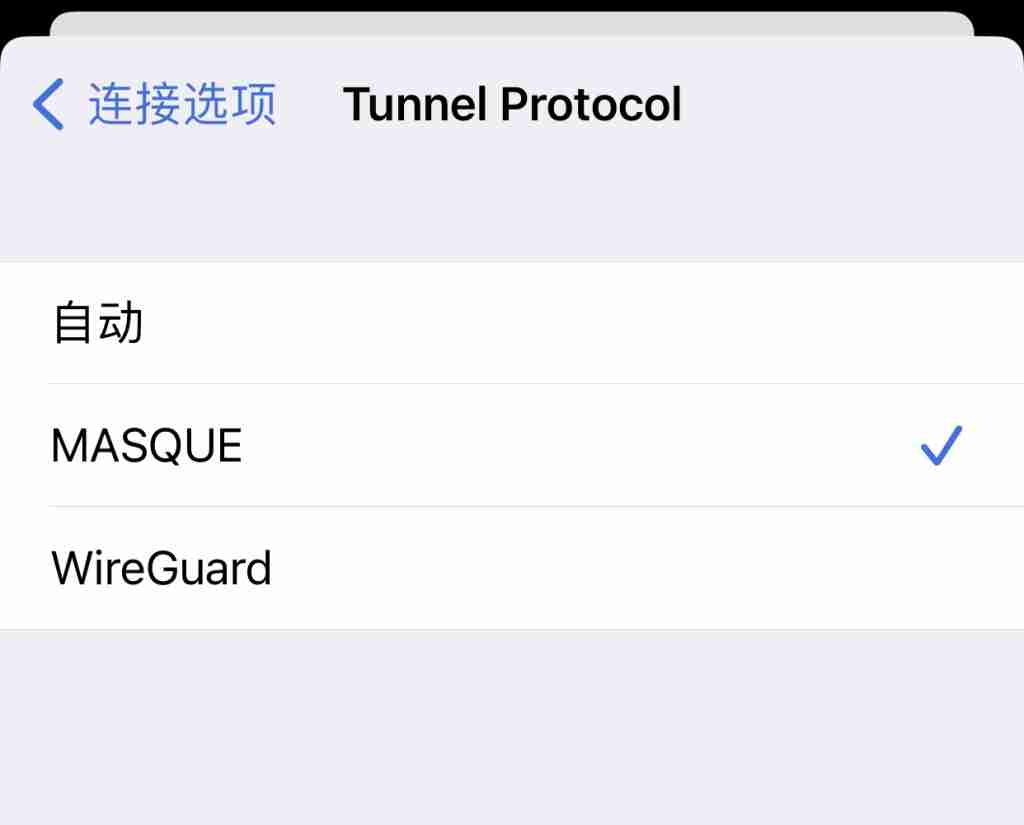
2. Common Client Operations
The warp clients we commonly use include Windows/Mac/iOS/Android. I will list the differences one by one.
1. Windows
Windows is a little more complicated, and you need to add an additional file to the installation folder: mdm.xml
warp_tunnel_protocol masqueYou can create a txt file, copy the code into it, and then change the file name to: mdm.xml
Then put the file here: C:ProgramDataCloudflare
Then restart warp (use ctrl+alt+del to shut it down during the process).
2. Mac
Download the client and change the protocol.
3. iOS/iPadOS
Download the client and change the protocol.
4. Android
In the Google Store, the latest version of Warp client is only available in beta. So, you need to join the beta list first. Just search for warp and you will see it in the middle of the app introduction page.
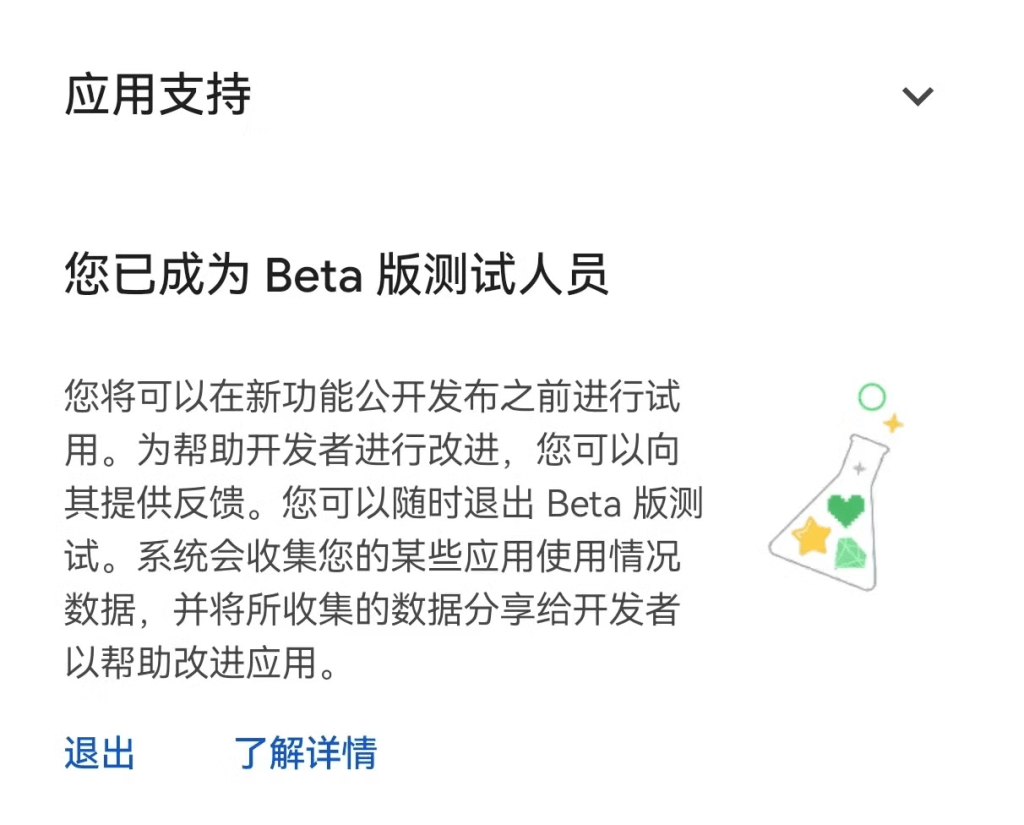
After you apply to join, which takes a few minutes, you can then download the beta version.
2. Zero Trust Settings
If you are using the warp team mode, you need to change the settings in the cloudflare background.
Specific location: zero trust-settings-warp client-device settings-Default-configure
In "Device tunnel protocol", change WireGuard to MASQUE.
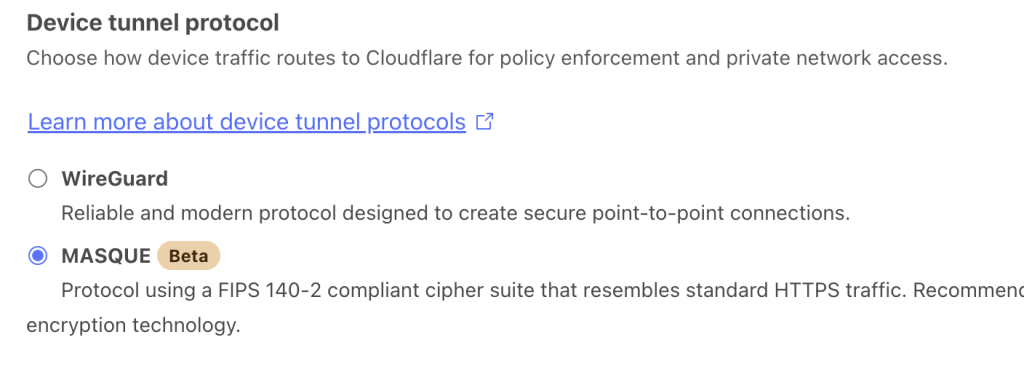
3. Traffic Key
If you want to use warp+, you can try the following set of keys.
🔐Key: I504Ot6M-27Vo0cY5-z5204KAN (1923837100 GB)
🔐 Key: 48wkM7I3-26hQl9Y4-l03n89yk (1923837100 GB)
🔐 Key: 0Pl1L4j8-7e053XVY-4MZx91k2 (1923837100 GB)
🔐 Key: 316S4Fmc-5K28cJ1Y-6o17a3IO (1923837100 GB)
🔐 Key: n14s8NS5-8PjN56f7-352gERf1 (1923837100 GB)
4. Warp New Protocol Experience
If you use zero trust, the IP will be located in China because it will be selected based on the nearest location. You can watch YouTube, but you cannot open Netflix, Disney plus, ChatGPT, Claude, Gemini, etc.
If you switch to normal mode, that is, wap, the IP is the United States, and everything is normal.
At 11pm on September 23, in warp mode, Netflix's speed reached 60M, which is quite fast.
Among all the clients, only Android is always abnormal. I don’t know if it is due to Huawei’s debuff.
Regarding Warp, my opinion is as the title says. It can be used as a backup, but I don't recommend it. Just like Xray, don't underestimate GW's update capabilities. Whether it is blocked or not depends on whether it wants to, not whether it can. As long as the traffic is large, it is only a matter of time before it is blocked again.
The result of all the hard work may be just a moment of happiness. Instead of doing that, it is better to find a cheap and unpopular VPS and set up a node for low-key use.
IP stability is everything.
I will put the tutorials on warp application, operation, IP optimization and vps node building at the end, I hope it will be helpful.
Cloudflare WARP: Will free unlimited traffic make us throw away our VPNs?
Cloudflare Warp's preferred IP can be used on Windows/Mac/iPhone/Android/iPad
How to buy VPS? Three keywords: $10, unlimited traffic, pure IP
It’s not easy to write articles, please click on the advertisement, thank you~
Some tools organized, you can take a look if you need them
1. Create a pure network environment
1,Fingerprint Browser: Registration link, Invitation code: u73626Nx
2. Residential IP:Registration link
3. Enable domestic mobile phones to support eSIM: Registration link Coupon code: playsoul
2. Overseas bank cards that can be applied for with a passport
1. Wise:Registration link
Registration and deposit tutorial:https://dlj.playfulzone.top/6tuvu4
2. N26:Registration link Invitation code: jinglonj3130
3. Digital Currency Trading Platform
1. Binance:Registration link
2. Bybit:Registration link Invite code: R3PMVVV
4. Self-use VPS
1. Unlimited data
2. 3TB of data for $10
3. High-quality lines
4. Unblock streaming media
5. Other tools
SMS code receiving platform: Registration link
Personal streaming carpool (Telegram): @playfulsoulnet
Netflix and other streaming media/AI ride-sharing platforms: 10% discount code: playful
