I never thought that I could write two tutorials just by registering a Google account.
[Historical Review:Using Google from Scratch [001]: Account Registration and Basic Settings, "Lock Region" Anti-Bounce Tips|2025 Edition】
This article mainly solves two problems: How to skip or avoid the QR code scanning or SMS verification required by Google when registering a Google account.
This issue actually occurred in September 2025, but I didn't pay much attention to it. I registered two new accounts at the time. The first one used a Pixel phone to scan a QR code for verification, and the second used SMS verification via the code receiving platform. I originally thought that the two verification methods appeared randomly and were highly correlated with the quality of the IP address.
Today, I needed to register some new accounts for testing, and I kept running into the requirement to scan a QR code with my phone. After some research, I discovered that Google had been promoting this "unbelievable" anti-registration mechanism since the beginning of the year. This situation is bad news for those who need to register multiple Google accounts using a code-sharing platform.
So I combined the four devices of Mac computer, Windows computer, Android phone and iPhone, and the five systems of macOS, Windows, Linux, Android and iOS in the fingerprint browser, with the normal and incognito browsing modes of Chrome browser, and then used the residential IP and computer room IP of the United States, India and other countries. Finally, I found a method with a higher success rate, skipped the forced verification mode of the QR code, and successfully used the mobile phone number of the code receiving platform to register a Google account.
In this video, I'll briefly replicate the registration results for each scenario. The final results are in the summary section at the end of the video. Feel free to watch it. Okay, let's get started.
✅ **🔗Related Links**
* **SMS code receiving platform:** https://dlj.playfulzone.top/x6dw3u
**Residential IP:** https://dlj.playfulzone.top/ebyt7z
* **Fingerprint Browser:** https://share.adspower.net/playful [Promotion code: playful]
1. Why should I skip QR code verification?
Anyone who has registered a Google account knows that each account requires a mobile phone number to receive a text message verification code to successfully complete the registration. Even if you skip the SMS verification during the registration process due to a relatively clean IP address, there is a high probability that you will be required to perform SMS verification during normal use of the account later.
Generally speaking, one mobile phone number can verify two accounts in a short period of time. Therefore, if you want to register multiple Google accounts, you need to use a code receiving platform like SMS-activate.
However, Google's introduction of mandatory QR code verification to prevent SIM card swapping attacks and account abuse will prevent us from using these code-receiving platforms. This is because the act of scanning the QR code actually causes our phone to actively send a verification SMS to the Google server through the carrier network.
It has to be said that in addition to considerations such as security precautions and obtaining user device information, this approach also has the effect of reducing the company's SMS operating costs.
This incredible anti-registration abuse mechanism actually has limited impact on ordinary people, but it is bad news for friends who need to use fingerprint browsers to isolate multiple accounts: because under the fingerprint browser, except for the Linux system, both computers and mobile phones will be required to scan and verify the QR code device.
Therefore, if Google mandates "QR code device verification" across all platforms in the future, one category of products will either become extremely popular or disappear due to the overwhelming user adoption: carrier plans that offer free or low-cost phone number changes. I know of a few of these products, so if you're interested, please leave a message. If there are a lot of people using them, I'll find time to review them. If you know of similar carrier plans, please send me a private message or leave a comment to share your experiences.
II. Registration Practice and Results for Various Environments
Next, I will divide the registration environment into two categories: fingerprint browsers and normal hardware devices. I will share the final results with you under different systems and IP addresses of different countries, including macOS, Windows, Android, iOS, and Linux. I believe it will surprise you.
I also discovered this topic during actual registration. Therefore, I will re-run the fingerprint browser section, recording and syncing data on Mac, Windows, Android, iPhone, and other normal devices. Some results will be shown as screenshots.
It should be noted that the following results have been basically reproduced by me, but the probability is not 100%. If it does not work, either change the device or change the environment. Try more and you will always succeed.
(1) Fingerprint browser
| System Type | US IP | Indian IP |
|---|---|---|
| Mac-arm | ✖️ | ✖️ |
| Mac-intel | ✖️ | —— |
| windows | ✖️ | —— |
| Android | ✖️ / ✅ | —— |
| iOS | ✖️ | —— |
| Linux | ✅ | —— |
Operation process: Watch the video
Note: We also tested Chrome Incognito mode in the fingerprint browser, but still could not skip the QR code verification.
(2) Normal hardware equipment
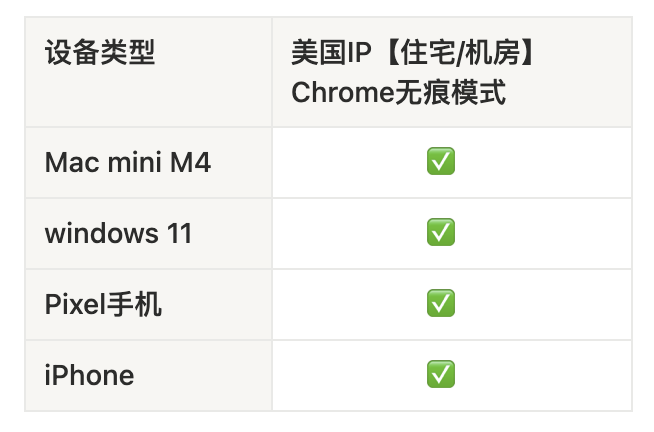
Note: I also tried another "creepy" method on my fingerprint browser and Mac: changing the browser language to Indian English. Some netizens said it worked, but I didn't succeed, so I won't show it here.
3. Summary
Finally, let’s summarize.
After testing in more than 10 network environments, the results surprised me: the combination of fingerprint browser and residential IP was almost completely wiped out, and only under the Linux system did it have a higher success rate; but normal computers and mobile devices with Chrome incognito mode can successfully register using SMS code reception.
I can only say that Google's fingerprint anti-detection technology is quite impressive. However, different brands of fingerprint browsers have different customizable parameters, and I only used the default settings. I'll explore the potential of fingerprint browsers when I have time.
As for those who want to isolate the account's network environment and pass Google's QR code mandatory verification, individual users can pay more attention to low-cost mobile phone numbers, or operators that allow free mobile phone number changes. By accumulating five or six mobile phone numbers, plus domestic mobile phone number main and secondary cards, it is not difficult to maintain a dozen Google accounts normally.
If you don’t care too much about the uniqueness of the network environment, you can first register an account using the device you have, and then log in to the fingerprint browser to maintain the account.
In short, everyone can choose the method of registering an account according to their needs.
Well, that's all for this video. If you find it useful, you can subscribe to my channel, or you can bookmark, like, comment, or forward it. If you have a better idea, please share it in the comment section.
That's it, bye-bye~
