Most of this kind of knowledge I learned from watching Bad Forest andYong brother talksIf you want to learn systematically, you can go to the blogs, YouTube and GitHub of these two big guys.
If you have more than one VPS, you may have the same question as me:
Some VPSs have fast direct access to China, but the IP quality is average, such as BandwagonHost with three network optimizations;
Some VPSs have slow direct access to China, but the IP quality is very good, such as IPRaft with dual ISPs;
Is there a possibility?Use the former as a transit server and the latter as a landing server, so that both access speed and IP quality are achieved..
Of course you can, this requires port forwarding.
There are many similar methods, but I think this one is the simplest.
Let me briefly demonstrate it to you.
Since I only use port forwarding in bypassing openwrt and V2ray, if you use other clients, I suggest you read more tutorials by Bad Lin. (Search keywords: port forwarding, chain proxy, etc.)
1. Scenarios and Requirements
VPS A: The server room IP (1.1.1.1) has a fast direct connection to three networks and can be used as a transit server
VPS B: Residential IP (2.2.2.2), pure quality and low risk, can be used as a landing server
The specific link is: equipment→Relay Server→Landing Server→website
Since the device is connected to A (1.1.1.1), the data is forwarded through the port and finally accesses the website through B (2.2.2.2). Therefore, the IP finally displayed is 2.2.2.2.
This method can also be used to rescue blocked IPs, and everyone can use their imagination to expand their thinking.
2. Basic Settings
Install X-UI on the two VPSs first and build nodes.
I used the installation script from Yongge, and the others are the same. If you don't know how to do it, you can search for Yongge's tutorial.
bash <(wget -qO- )
After the installation is complete, create a node on the server VPS B first, you can use vmess/vless/ss.
3. Transit Server Settings
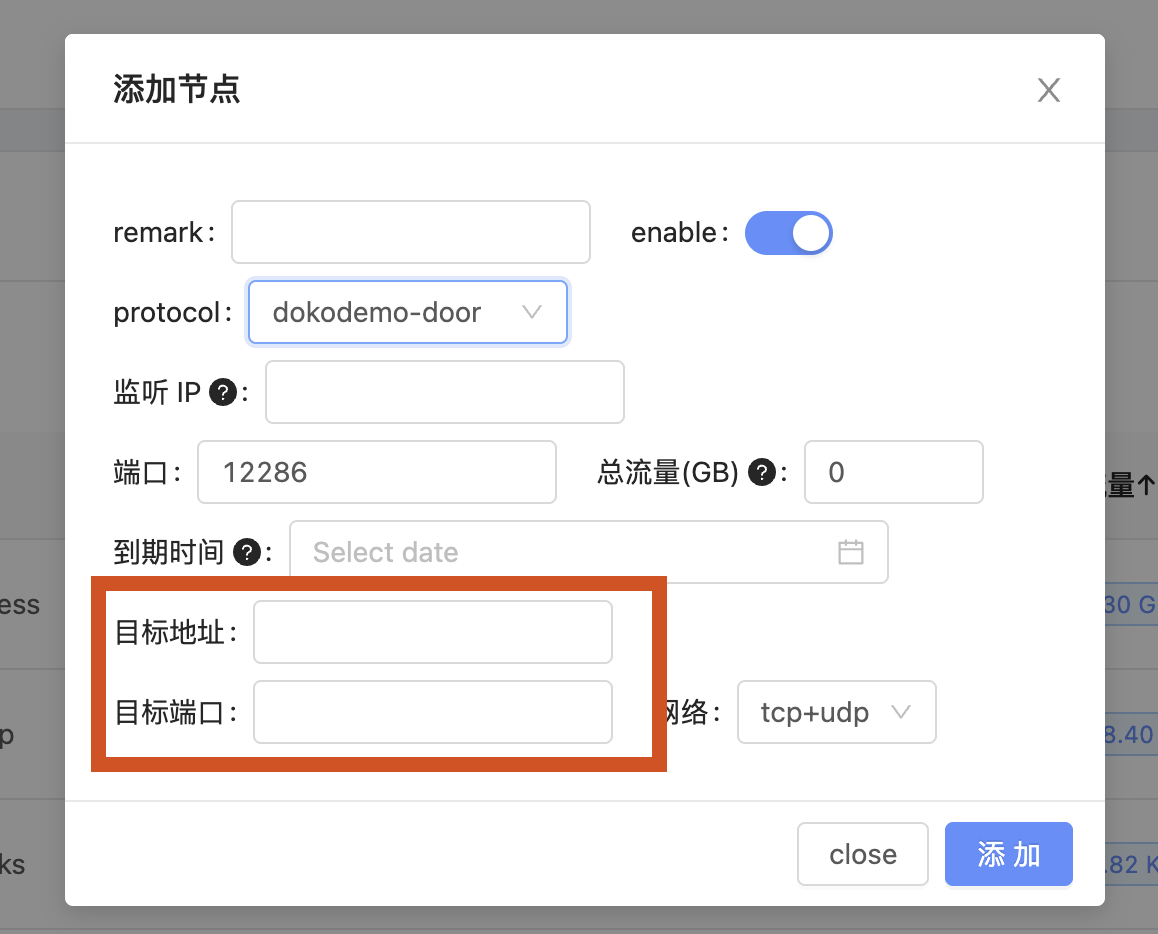
Create a transit service on VPS A and enter the X-UI settings page:
"Create Node→dokodemo door”
Target address: IP address of VPS B
Target port: the port of the landing server VPS B node
4. Landing Node Settings
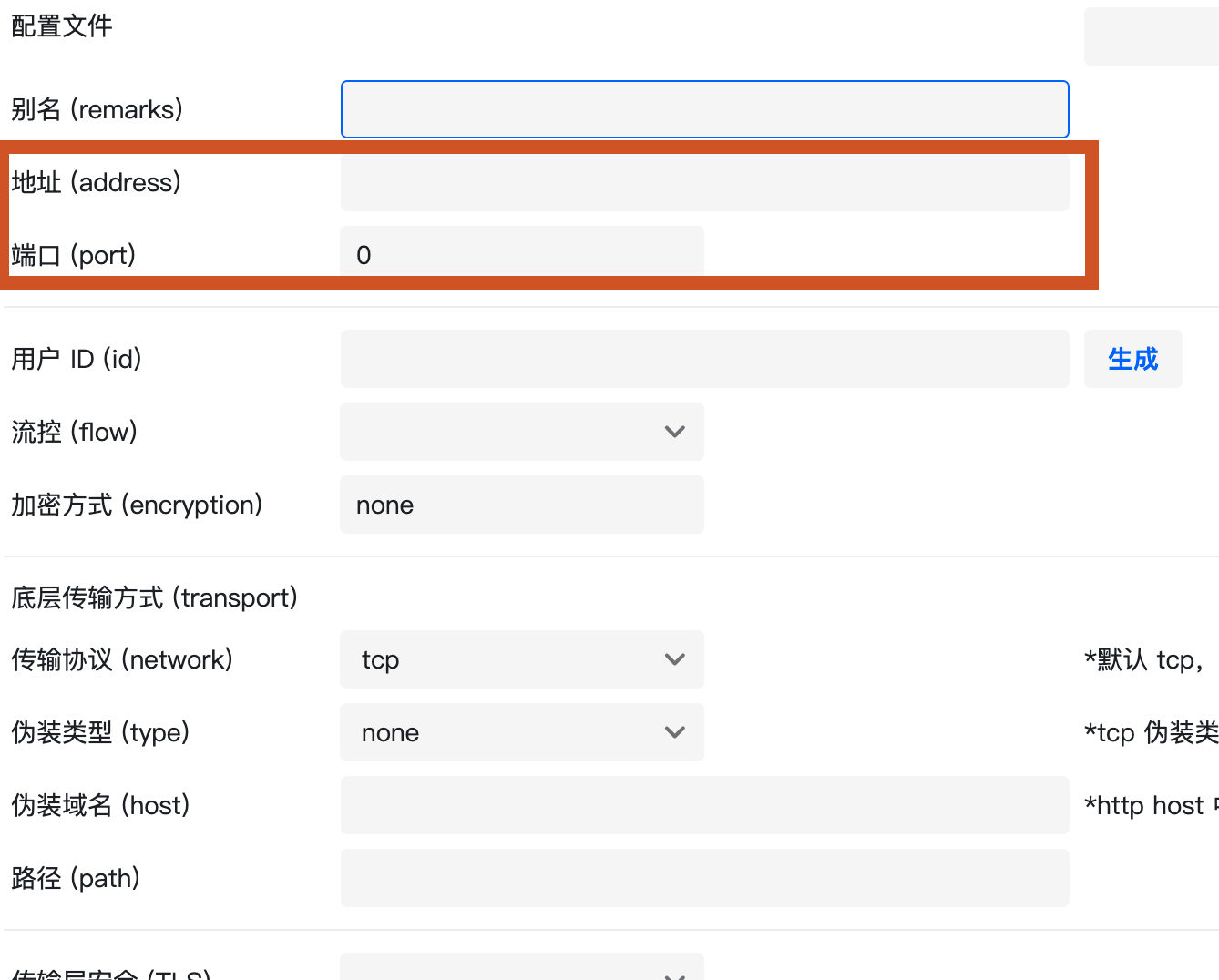
In V2ray, you need to change the node settings of the landing server VPS B.
Change the address and port number to the IP and port number of the transit server VPS A.
This completes the "Device→Relay Server→Landing Server→website” data port forwarding settings.
5. Data usage
Finally, let’s talk about the traffic usage of transit and servers.
As long as the data passes through the VPS, the traffic needs to be calculated, including upstream and downstream. The only difference is the billing method of VPS traffic. Because some VPS only calculates downstream traffic. Therefore, generally speaking, 1G is used for upstream and downstream; then, VPS A and B will use 1G respectively.
If it is only used for daily use, and the monthly traffic is 1T or 750G, you can definitely use it with confidence.
In addition, in this combination, you should pay attention to the connection speed between the transit server and the landing server, and do not make it too slow to affect the user experience. For the transit server, try to choose a direct connection/optimized line between three networks, or a computer room with a relatively close physical location, such as Japan, South Korea, etc.
If you have too many VPS to use and don't know how to combine them to make it faster, you can usetraceroute Command to see the data outbound and return conditions before deciding
As for which VPS is more suitable, friends who don’t know can search for the keyword “VPS” to view previous tutorials.
In addition, 618 is also a promotional period, so friends who need it can hurry up.

I really like your blog.. very nice colors & theme.
Did you create this website yourself or did you hire
someone to do it for you? Plz respond as I’m looking to create my own blog and would like to find out where u got this from.
thanks a lot