Regarding overseas mobile phone numbers, from a general perspective, I recommend that you try to have a US mobile phone number. I have writtenultramobile,talkatone,helium mobileIn addition, plans like tello and us mobile are not too expensive at around $5 per month.
Giffgaff, mentioned here, is a wholly-owned subsidiary of O2, one of the UK's three major telecom operators. Its pay-as-you-go plan requires a £10 top-up to activate, and then a balance adjustment every six months to keep your number. For example, in China, receiving text messages is free, while sending text messages costs £0.30 per message. A blogger noted that with Wi-Fi enabled, text messages are charged at the UK domestic rate, £0.10 per message.
Since I'm a casual texter, I didn't verify the final charges, nor could I find clear rates on the official website. Even at £0.30, the annual cost of keeping a Giffgaff number is only about 6 yuan. This makes it a very cost-effective overseas mobile phone number.
I have used this mobile phone number to register multiple overseas accounts including Google, Apple ID, WhatsApp, Telegram, Twitter, Facebook, etc., and there are basically no restrictions.
Next, I will share with you the entire process of purchase, activation, recharge and number preservation.
1. Where to buy
giffgaff has two types: physical cards and eSIM. Let’s talk about them separately.
1. Physical card
There are two channels to purchase physical cards. One is to place an order for free on the official website, and the other is to purchase from an e-commerce platform.
On the official website homepage (giffgaff.com), select "order your free SIM", select "NO thanks, I just want a free SIM", and fill in the address information as required.
Filling out the form with tips: Since Giffgaff sends mail by standard mail, if you don't have a mailbox or are in a remote area, you might not receive it. For example, I live in Beijing and have a mailbox, but I haven't received it even after filling out the form multiple times. It's purely a matter of chance. To increase the chances of the postman finding you, you can include your phone number in the address.
If you want a physical card, you can also order it on an e-commerce platform. It costs about ten yuan, which is not expensive. I won’t post the picture because the last time I posted it, it was directly deleted on some platforms.
2. eSIM card
In addition to the physical card, you can also download the giffgaff app and activate the eSIM directly on the app. The whole process is similar.
First select "eSIM" on the homepage and choose a package
Then scroll down to the bottom, select "I don't want a plan", and select "continue"
Then select "£10" to activate.
Whether to choose a physical card or eSIM, you can choose according to your own situation.
The difference is that you can apply for a physical card through an invitation link, and you can get £5 for a £10 top-up. eSIM does not have this benefit.
So, I will put my own invitation link, and you can use it if you want.
Invite link:
https://dlj.playfulzone.top/zwte5c
Since I can't do anything else with this free phone credit, if I can save up a few dozen pounds, I'll test the giffgaff internet speed for everyone.
2. How to activate
In fact, as mentioned during the purchase process, eSIM is recharged and activated together.
The physical card is:
When you receive the physical card with the "activate code" on it, go to the official website homepage, select "activate your SIM", follow the activation process, fill in your personal information and top up. The top-up amount is also 10 pounds.
3. Recharge
The recharge method of giffgaff is also very simple, as long as you have a foreign currency bank card, such as visa, mastercard, etc.
I have linked a visa card of China Everbright Bank.
Therefore, there is no threshold for payment methods and no overseas bank is required.
IV. Number Retention
In order to ensure that the giffgaff card can be used normally, the balance needs to be changed every six months.
Generally speaking, you don't have to worry about not remembering it because you will receive text messages and email reminders a month in advance, and then you can just find a number and send a text message.
The only thing worth reminding is to pay attention to junk text messages on your mobile phone and junk emails in your mailbox to avoid missing any information.
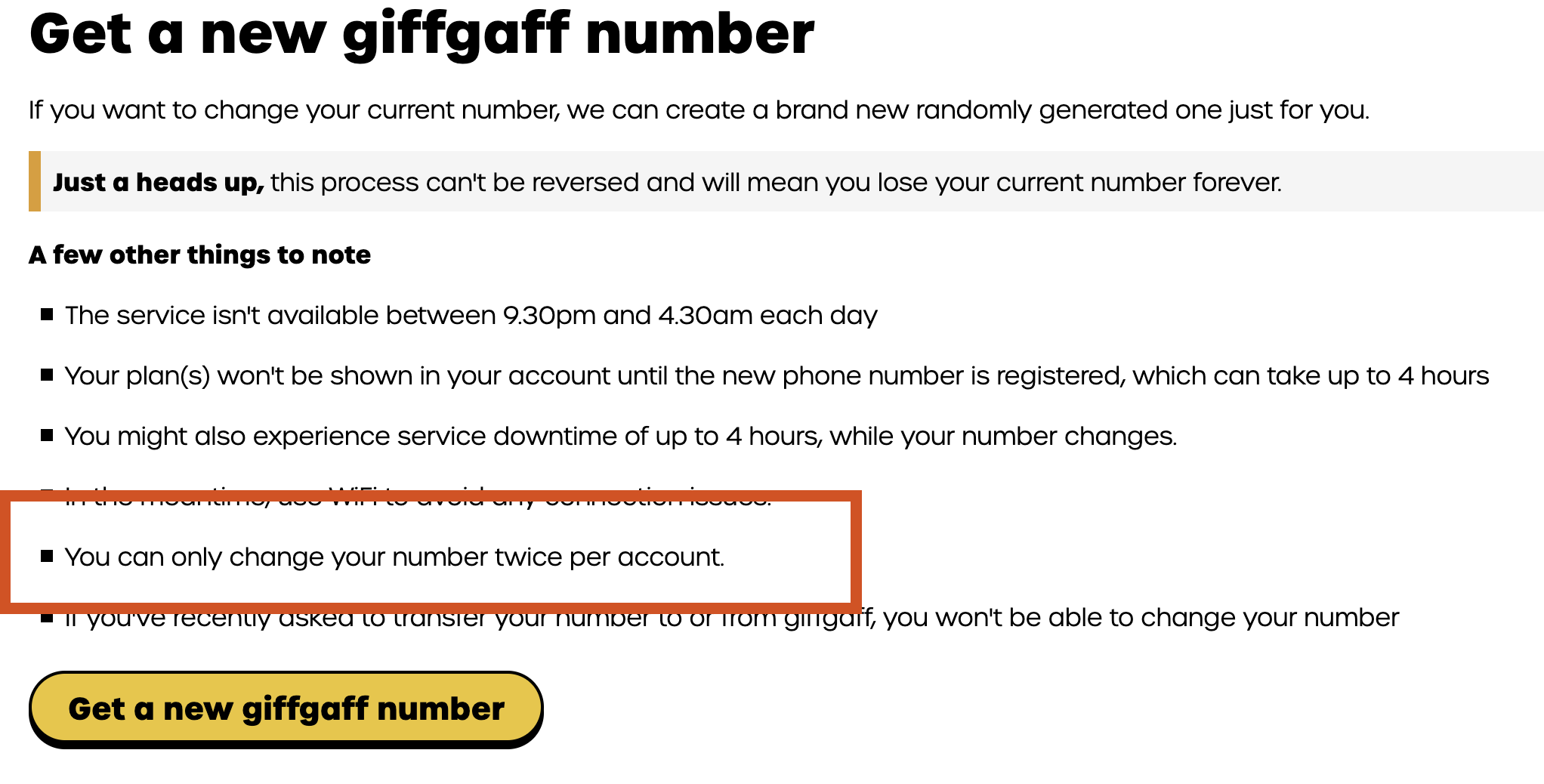
5. You can change your number twice for free
I forgot to mention the video version, let me add it again.
In “Profile and settings—Get a new giffgaff number , selectChange your giffgaff number”, you can change your number twice for free. If you need to apply for multiple accounts and don’t need to keep the previous number, you can consider this function.
Well, that’s all about giffgaff’s mobile number.
All content from purchase to insurance
If you think it is useful
You can subscribe to my channel
I will regularly share tutorials on how to use overseas tools
You can also collect, like, comment, and forward
That's it
bye-bye~

You can only change your number once, but you can get two numbers. The first time, you are given a number when you register, and the second time you change one yourself.